301 lines
12 KiB
Markdown
301 lines
12 KiB
Markdown

|
<div align="center">
|
|||
|
|
|
|||
|
|

|
|||
|
|
|
|||
|
|
<img alt="GitHub Repo stars" src="https://img.shields.io/github/stars/ConardLi/easy-dataset">
|
|||
|
|
<img alt="GitHub Downloads (all assets, all releases)" src="https://img.shields.io/github/downloads/ConardLi/easy-dataset/total">
|
|||
|
|
<img alt="GitHub Release" src="https://img.shields.io/github/v/release/ConardLi/easy-dataset">
|
|||
|
|
<img src="https://img.shields.io/badge/license-AGPL--3.0-green.svg" alt="AGPL 3.0 License"/>
|
|||
|
|
<img alt="GitHub contributors" src="https://img.shields.io/github/contributors/ConardLi/easy-dataset">
|
|||
|
|
<img alt="GitHub last commit" src="https://img.shields.io/github/last-commit/ConardLi/easy-dataset">
|
|||
|
|
<a href="https://arxiv.org/abs/2507.04009v1" target="_blank">
|
|||
|
|
<img src="https://img.shields.io/badge/arXiv-2507.04009-b31b1b.svg" alt="arXiv:2507.04009">
|
|||
|
|
</a>
|
|||
|
|
|
|||
|
|
<a href="https://trendshift.io/repositories/13944" target="_blank"><img src="https://trendshift.io/api/badge/repositories/13944" alt="ConardLi%2Feasy-dataset | Trendshift" style="width: 250px; height: 55px;" width="250" height="55"/></a>
|
|||
|
|
|
|||
|
|
**一个强大的大型语言模型微调数据集创建工具**
|
|||
|
|
|
|||
|
|
[简体中文](./README.zh-CN.md) | [English](./README.md)
|
|||
|
|
|
|||
|
|
[功能特点](#功能特点) • [快速开始](#本地运行) • [使用文档](https://docs.easy-dataset.com/) • [贡献](#贡献) • [许可证](#许可证)
|
|||
|
|
|
|||
|
|
如果喜欢本项目,请给本项目留下 Star⭐️,或者请作者喝杯咖啡呀 => [打赏作者](./public/imgs/aw.jpg) ❤️!
|
|||
|
|
|
|||
|
|
</div>
|
|||
|
|
|
|||
|
|
## 概述
|
|||
|
|
|
|||
|
|
Easy Dataset 是一个专为创建大型语言模型数据集而设计的应用程序。它提供了直观的界面,内置了强大的文档解析工具、智能分割算法、数据清洗和数据增强能力,可以将各种格式的领域文献转化为高质量结构化数据集,可用于模型微调、RAG、模型效果评估等场景。
|
|||
|
|
|
|||
|
|

|
|||
|
|
|
|||
|
|
## 新闻
|
|||
|
|
|
|||
|
|
🎉🎉 Easy Dataset 1.7.0 版本上线全新的评估能力,你可以轻松将领域文献转换为评估数据集(测试集),并且可以自动执行多维度评估任务,另外还配备人工盲测系统,可以轻松助你完成垂直领域模型评估、模型微调后效果评估、RAG 召回率评估等需求,使用教程: [https://www.bilibili.com/video/BV1CRrVB7Eb4/](https://www.bilibili.com/video/BV1CRrVB7Eb4/)
|
|||
|
|
|
|||
|
|
## 功能特点
|
|||
|
|
|
|||
|
|
### 📄 文档处理与数据生成
|
|||
|
|
|
|||
|
|
- **智能文档处理**:支持 PDF、Markdown、DOCX、TXT、EPUB 等多种格式智能识别和处理
|
|||
|
|
- **智能文本分割**:支持多种智能文本分割算法(Markdown 结构、递归分隔符、固定长度、代码智能分块等),支持自定义可视化分段
|
|||
|
|
- **智能问题生成**:从每个文本片段中自动提取相关问题,支持问题模板和批量生成
|
|||
|
|
- **领域标签树**:基于文档目录智能构建全局领域标签树,具备全局理解和自动打标能力
|
|||
|
|
- **答案生成**:使用 LLM API 为每个问题生成全面的答案和思维链(COT),支持 AI 智能优化
|
|||
|
|
- **数据清洗**:智能清洗文本块内容,去除噪音数据,提升数据质量
|
|||
|
|
|
|||
|
|
### 🔄 多种数据集类型
|
|||
|
|
|
|||
|
|
- **单轮问答数据集**:标准的问答对格式,适合基础微调
|
|||
|
|
- **多轮对话数据集**:支持自定义角色和场景的多轮对话格式
|
|||
|
|
- **图片问答数据集**:基于图片生成视觉问答数据,支持多种导入方式(目录、PDF、压缩包)
|
|||
|
|
- **数据蒸馏**:无需上传文档,直接从领域主题自动生成标签树和问题
|
|||
|
|
|
|||
|
|
### 📊 模型评估体系
|
|||
|
|
|
|||
|
|
- **评估数据集**:支持生成判断题、单选题、多选题、简答题、开放题等多种题型的评估测试集
|
|||
|
|
- **模型自动评估**:使用教师模型(Judge Model)自动评估模型回答质量,支持自定义评分规则
|
|||
|
|
- **人工盲测 (Arena)**:双盲对比两个模型的回答质量,消除偏见进行公正评判
|
|||
|
|
- **AI 质量评估**:对生成的数据集进行自动质量评分和筛选
|
|||
|
|
|
|||
|
|
### 🛠️ 高级功能
|
|||
|
|
|
|||
|
|
- **自定义提示词**:项目级自定义各类提示词模板(问题生成、答案生成、数据清洗等)
|
|||
|
|
- **GA 组合生成**:文体-受众对生成,丰富数据多样性
|
|||
|
|
- **任务管理中心**:后台批量任务处理,支持任务监控和中断
|
|||
|
|
- **资源监控看板**:Token 消耗统计、调用次数追踪、模型性能分析
|
|||
|
|
- **模型测试 Playground**:支持最多 3 个模型同时对比测试
|
|||
|
|
|
|||
|
|
### 📤 导出与集成
|
|||
|
|
|
|||
|
|
- **多种导出格式**:支持 Alpaca、ShareGPT、Multilingual-Thinking 等格式,JSON/JSONL 文件类型
|
|||
|
|
- **平衡导出**:按标签配置导出数量,实现数据集均衡
|
|||
|
|
- **LLaMA Factory 集成**:一键生成 LLaMA Factory 配置文件
|
|||
|
|
- **Hugging Face 上传**:直接将数据集上传至 Hugging Face Hub
|
|||
|
|
|
|||
|
|
### 🤖 模型支持
|
|||
|
|
|
|||
|
|
- **广泛的模型兼容**:兼容所有遵循 OpenAI 格式的 LLM API
|
|||
|
|
- **多提供商支持**:OpenAI、Ollama(本地模型)、智谱 AI、阿里百炼、OpenRouter 等
|
|||
|
|
- **视觉模型**:支持 Gemini、Claude 等视觉模型用于 PDF 解析和图片问答
|
|||
|
|
|
|||
|
|
### 🌐 用户体验
|
|||
|
|
|
|||
|
|
- **用户友好界面**:为技术和非技术用户设计的现代化直观 UI
|
|||
|
|
- **多语言支持**:完整的中英文界面支持
|
|||
|
|
- **数据集广场**:发现和探索各种公开数据集资源
|
|||
|
|
- **桌面客户端**:提供 Windows、macOS、Linux 桌面应用
|
|||
|
|
|
|||
|
|
## 快速演示
|
|||
|
|
|
|||
|
|
https://github.com/user-attachments/assets/6ddb1225-3d1b-4695-90cd-aa4cb01376a8
|
|||
|
|
|
|||
|
|
## 本地运行
|
|||
|
|
|
|||
|
|
### 下载客户端
|
|||
|
|
|
|||
|
|
<table style="width: 100%">
|
|||
|
|
<tr>
|
|||
|
|
<td width="20%" align="center">
|
|||
|
|
<b>Windows</b>
|
|||
|
|
</td>
|
|||
|
|
<td width="30%" align="center" colspan="2">
|
|||
|
|
<b>MacOS</b>
|
|||
|
|
</td>
|
|||
|
|
<td width="20%" align="center">
|
|||
|
|
<b>Linux</b>
|
|||
|
|
</td>
|
|||
|
|
</tr>
|
|||
|
|
<tr style="text-align: center">
|
|||
|
|
<td align="center" valign="middle">
|
|||
|
|
<a href='https://github.com/ConardLi/easy-dataset/releases/latest'>
|
|||
|
|
<img src='./public/imgs/windows.png' style="height:24px; width: 24px" />
|
|||
|
|
<br />
|
|||
|
|
<b>Setup.exe</b>
|
|||
|
|
</a>
|
|||
|
|
</td>
|
|||
|
|
<td align="center" valign="middle">
|
|||
|
|
<a href='https://github.com/ConardLi/easy-dataset/releases/latest'>
|
|||
|
|
<img src='./public/imgs/mac.png' style="height:24px; width: 24px" />
|
|||
|
|
<br />
|
|||
|
|
<b>Intel</b>
|
|||
|
|
</a>
|
|||
|
|
</td>
|
|||
|
|
<td align="center" valign="middle">
|
|||
|
|
<a href='https://github.com/ConardLi/easy-dataset/releases/latest'>
|
|||
|
|
<img src='./public/imgs/mac.png' style="height:24px; width: 24px" />
|
|||
|
|
<br />
|
|||
|
|
<b>M</b>
|
|||
|
|
</a>
|
|||
|
|
</td>
|
|||
|
|
<td align="center" valign="middle">
|
|||
|
|
<a href='https://github.com/ConardLi/easy-dataset/releases/latest'>
|
|||
|
|
<img src='./public/imgs/linux.png' style="height:24px; width: 24px" />
|
|||
|
|
<br />
|
|||
|
|
<b>AppImage</b>
|
|||
|
|
</a>
|
|||
|
|
</td>
|
|||
|
|
</tr>
|
|||
|
|
</table>
|
|||
|
|
|
|||
|
|
### 使用 NPM 安装
|
|||
|
|
|
|||
|
|
1. 克隆仓库:
|
|||
|
|
|
|||
|
|
```bash
|
|||
|
|
git clone https://github.com/ConardLi/easy-dataset.git
|
|||
|
|
cd easy-dataset
|
|||
|
|
```
|
|||
|
|
|
|||
|
|
2. 安装依赖:
|
|||
|
|
|
|||
|
|
```bash
|
|||
|
|
npm install
|
|||
|
|
```
|
|||
|
|
|
|||
|
|
3. 启动开发服务器:
|
|||
|
|
|
|||
|
|
```bash
|
|||
|
|
npm run build
|
|||
|
|
|
|||
|
|
npm run start
|
|||
|
|
```
|
|||
|
|
|
|||
|
|
4. 打开浏览器并访问 `http://localhost:1717`
|
|||
|
|
|
|||
|
|
### 使用官方 Docker 镜像
|
|||
|
|
|
|||
|
|
1. 克隆仓库:
|
|||
|
|
|
|||
|
|
```bash
|
|||
|
|
git clone https://github.com/ConardLi/easy-dataset.git
|
|||
|
|
cd easy-dataset
|
|||
|
|
```
|
|||
|
|
|
|||
|
|
2. 更改 `docker-compose.yml` 文件:
|
|||
|
|
|
|||
|
|
```yml
|
|||
|
|
services:
|
|||
|
|
easy-dataset:
|
|||
|
|
image: ghcr.io/conardli/easy-dataset
|
|||
|
|
container_name: easy-dataset
|
|||
|
|
ports:
|
|||
|
|
- '1717:1717'
|
|||
|
|
volumes:
|
|||
|
|
- ./local-db:/app/local-db
|
|||
|
|
- ./prisma:/app/prisma
|
|||
|
|
restart: unless-stopped
|
|||
|
|
```
|
|||
|
|
|
|||
|
|
> **注意:** 建议直接使用当前代码仓库目录下的 `local-db` 和 `prisma` 文件夹作为挂载路径,这样可以和 NPM 启动时的数据库路径保持一致。
|
|||
|
|
|
|||
|
|
> **注意:** 数据库文件会在首次启动时自动初始化,无需手动执行 `npm run db:push`。
|
|||
|
|
|
|||
|
|
3. 使用 docker-compose 启动
|
|||
|
|
|
|||
|
|
```bash
|
|||
|
|
docker-compose up -d
|
|||
|
|
```
|
|||
|
|
|
|||
|
|
4. 打开浏览器并访问 `http://localhost:1717`
|
|||
|
|
|
|||
|
|
### 使用本地 Dockerfile 构建
|
|||
|
|
|
|||
|
|
如果你想自行构建镜像,可以使用项目根目录中的 Dockerfile:
|
|||
|
|
|
|||
|
|
1. 克隆仓库:
|
|||
|
|
|
|||
|
|
```bash
|
|||
|
|
git clone https://github.com/ConardLi/easy-dataset.git
|
|||
|
|
cd easy-dataset
|
|||
|
|
```
|
|||
|
|
|
|||
|
|
2. 构建 Docker 镜像:
|
|||
|
|
|
|||
|
|
```bash
|
|||
|
|
docker build -t easy-dataset .
|
|||
|
|
```
|
|||
|
|
|
|||
|
|
3. 运行容器:
|
|||
|
|
|
|||
|
|
```bash
|
|||
|
|
docker run -d \
|
|||
|
|
-p 1717:1717 \
|
|||
|
|
-v ./local-db:/app/local-db \
|
|||
|
|
-v ./prisma:/app/prisma \
|
|||
|
|
--name easy-dataset \
|
|||
|
|
easy-dataset
|
|||
|
|
```
|
|||
|
|
|
|||
|
|
> **注意:** 建议直接使用当前代码仓库目录下的 `local-db` 和 `prisma` 文件夹作为挂载路径,这样可以和 NPM 启动时的数据库路径保持一致。
|
|||
|
|
|
|||
|
|
> **注意:** 数据库文件会在首次启动时自动初始化,无需手动执行 `npm run db:push`。
|
|||
|
|
|
|||
|
|
4. 打开浏览器,访问 `http://localhost:1717`
|
|||
|
|
|
|||
|
|
## 文档
|
|||
|
|
|
|||
|
|
- 有关所有功能和 API 的详细文档,请访问我们的 [文档站点](https://docs.easy-dataset.com/)
|
|||
|
|
- 查看本项目的演示视频:[Easy Dataset 演示视频](https://www.bilibili.com/video/BV1y8QpYGE57/)
|
|||
|
|
- 查看本项目的论文:[Easy Dataset: A Unified and Extensible Framework for Synthesizing LLM Fine-Tuning Data from Unstructured Documents](https://arxiv.org/abs/2507.04009v1)
|
|||
|
|
|
|||
|
|
## 社区教程
|
|||
|
|
|
|||
|
|
- [使用 Easy Dataset 完成测试集生成和模型评估](https://www.bilibili.com/video/BV1CRrVB7Eb4/)
|
|||
|
|
- [Easy Dataset × LLaMA Factory: 让大模型高效学习领域知识](https://buaa-act.feishu.cn/wiki/KY9xwTGs1iqHrRkjXBwcZP9WnL9)
|
|||
|
|
- [Easy Dataset 使用实战: 如何构建高质量数据集?](https://www.bilibili.com/video/BV1MRMnz1EGW)
|
|||
|
|
- [Easy Dataset 1.4 重点功能更新解读](https://www.bilibili.com/video/BV1fyJhzHEb7/)
|
|||
|
|
- [Easy Dataset 1.6 重点功能更新解读](https://www.bilibili.com/video/BV1Rq1hBtEJa/)
|
|||
|
|
- [大模型微调数据集: 基础知识科普](https://docs.easy-dataset.com/zhi-shi-ke-pu)
|
|||
|
|
- [实战案例1:生成汽车图片识别数据集](https://docs.easy-dataset.com/bo-ke/shi-zhan-an-li/an-li-1-sheng-cheng-qi-che-tu-pian-shi-bie-shu-ju-ji)
|
|||
|
|
- [实战案例2:评论情感分类数据集](https://docs.easy-dataset.com/bo-ke/shi-zhan-an-li/an-li-2-ping-lun-qing-gan-fen-lei-shu-ju-ji)
|
|||
|
|
- [实战案例3:物理学多轮对话数据集](https://docs.easy-dataset.com/bo-ke/shi-zhan-an-li/an-li-3-wu-li-xue-duo-lun-dui-hua-shu-ju-ji)
|
|||
|
|
- [实战案例4:AI 智能体安全数据集](https://docs.easy-dataset.com/bo-ke/shi-zhan-an-li/an-li-4ai-zhi-neng-ti-an-quan-shu-ju-ji)
|
|||
|
|
- [实战案例5:从图文 PPT 中提取数据集](https://docs.easy-dataset.com/bo-ke/shi-zhan-an-li/an-li-5-cong-tu-wen-ppt-zhong-ti-qu-shu-ju-ji)
|
|||
|
|
|
|||
|
|
## 贡献
|
|||
|
|
|
|||
|
|
我们欢迎社区的贡献!如果您想为 Easy Dataset 做出贡献,请按照以下步骤操作:
|
|||
|
|
|
|||
|
|
1. Fork 仓库
|
|||
|
|
2. 创建新分支(`git checkout -b feature/amazing-feature`)
|
|||
|
|
3. 进行更改
|
|||
|
|
4. 提交更改(`git commit -m '添加一些惊人的功能'`)
|
|||
|
|
5. 推送到分支(`git push origin feature/amazing-feature`)
|
|||
|
|
6. 打开 Pull Request(提交至 DEV 分支)
|
|||
|
|
|
|||
|
|
请确保适当更新测试并遵守现有的编码风格。
|
|||
|
|
|
|||
|
|
## 加交流群 & 联系作者
|
|||
|
|
|
|||
|
|
https://docs.easy-dataset.com/geng-duo/lian-xi-wo-men
|
|||
|
|
|
|||
|
|
## 许可证
|
|||
|
|
|
|||
|
|
本项目采用 AGPL 3.0 许可证 - 有关详细信息,请参阅 [LICENSE](LICENSE) 文件。
|
|||
|
|
|
|||
|
|
## 引用
|
|||
|
|
|
|||
|
|
如果您觉得此项目有帮助,请考虑以下列格式引用
|
|||
|
|
|
|||
|
|
```bibtex
|
|||
|
|
@misc{miao2025easydataset,
|
|||
|
|
title={Easy Dataset: A Unified and Extensible Framework for Synthesizing LLM Fine-Tuning Data from Unstructured Documents},
|
|||
|
|
author={Ziyang Miao and Qiyu Sun and Jingyuan Wang and Yuchen Gong and Yaowei Zheng and Shiqi Li and Richong Zhang},
|
|||
|
|
year={2025},
|
|||
|
|
eprint={2507.04009},
|
|||
|
|
archivePrefix={arXiv},
|
|||
|
|
primaryClass={cs.CL},
|
|||
|
|
url={https://arxiv.org/abs/2507.04009}
|
|||
|
|
}
|
|||
|
|
```
|
|||
|
|
|
|||
|
|
## Star History
|
|||
|
|
|
|||
|
|
[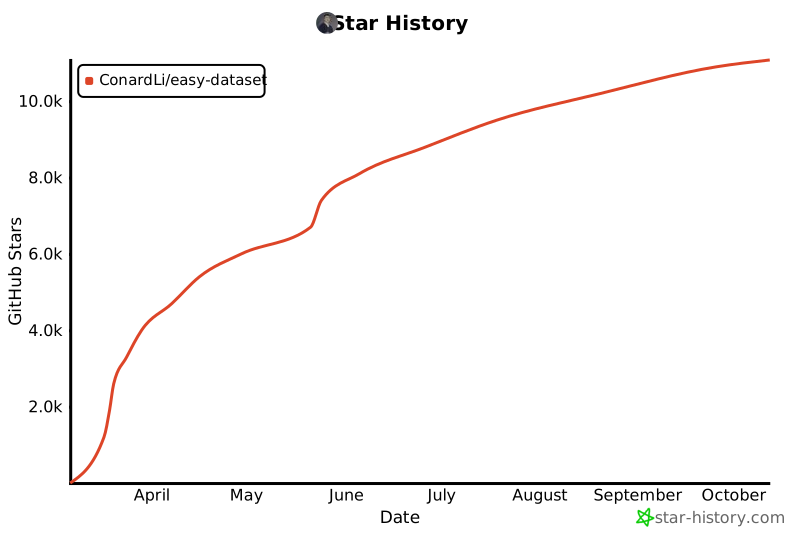](https://www.star-history.com/#ConardLi/easy-dataset&Date)
|
|||
|
|
|
|||
|
|
<div align="center">
|
|||
|
|
<sub>由 <a href="https://github.com/ConardLi">ConardLi</a> 用 ❤️ 构建 • 关注我:<a href="./public/imgs/weichat.jpg">公众号</a>|<a href="https://space.bilibili.com/474921808">B站</a>|<a href="https://juejin.cn/user/3949101466785709">掘金</a>|<a href="https://www.zhihu.com/people/wen-ti-chao-ji-duo-de-xiao-qi">知乎</a>|<a href="https://www.youtube.com/@garden-conard">Youtube</a></sub>
|
|||
|
|
</div>
|